

Promises: a brief introduction
Promise
The Promise object represents the eventual completion or failure of an asynchronous operation and its resulting value.
A Promise is in one of these states:
- pending
- fulfilled
- rejected
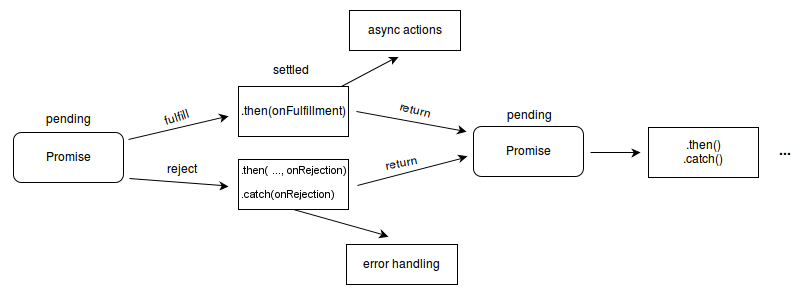
Image by MDN. Used under Creative Commons license.
A simple practical example would be:
const lateBloomer = (bloomed) => {
  return new Promise((resolve, reject) => {
    if (bloomed) {
      setTimeout(() => resolve('The flower bloomed.'), 300);
    } else {
      reject(new Error("The flower won't bloom!"));
    }
  });
};
Here we are creating a lateBloomer function that accepts a boolean argument and:
- fulfills the promise after 300 milliseconds if
bloomedistrue - rejects the promise if
bloomedisfalse
Conventionally, a promise can be called like this:
lateBloomer(false).then(
  (response) => {
    console.log(response);
  },
  (err) => {
    console.log(err.message);
  },
);
async and await
Handling promises became much easier with async and await.
An example would be:
const lateBloomerAsAsync = async (bloomed) => {
  if (!bloomed) {
    throw new Error("The flower won't bloom!");
  }

  await new Promise((resolve) => setTimeout(resolve, 10000));
  return 'The flower bloomed.';
};

async function logBloomStatusAsAsync() {
  try {
    const flowerStatus = await lateBloomerAsAsync(true);
    console.log(flowerStatus);
  } catch (err) {
    console.log(err.message);
  }
}

logBloomStatusAsAsync();
That is enough for a first introduction. Happy coding.