

This post is about building a basic application that uses Genkit flows, Angular, and Gemini 2.0 Flash.
The goal is a fun app that suggests a car based on the user’s personality.
This follows the Use Genkit in an Angular app tutorial loosely, because I hit errors while following the original version.
Introduction
Start by creating a full-stack Angular application with AI features.
Install the Genkit CLI globally. This is optional, but helpful:
npm install -g genkit-cli
My Angular version
Angular CLI: 20.2.0 Node: 22.17.0 Package Manager: npm 10.9.2 OS: win32 x64
Create the Angular application:
ng new genkit-ng-demo

✔ Which stylesheet format would you like to use? CSS
✔ Do you want to enable Server-Side Rendering (SSR) and Static Site Generation (SSG/Prerendering)? Yes
✔ Do you want to create a 'zoneless' application without zone.js? Yes
✔ Which AI tools do you want to configure with Angular best practices? None
Install the dependencies:
code ./genkit-ng-demo

npm install genkit
npm install @genkit-ai/googleai
npm install @genkit-ai/express
Optional: @genkit-ai/express error
When installing @genkit-ai/express, I hit this dependency error:
While resolving: genkit-ng-demo@0.0.0
npm error Found: express@5.1.0
npm error Could not resolve dependency:
npm error peer express@"^4.21.1" from @genkit-ai/express@1.16.1
The workaround was to pin express to ^4.21.1, reinstall, and then continue.
Define the Genkit flow
The ai.defineFlow function expects a Zod schema.
Install Zod
npm install zod
Create I/O schema
import z from 'zod';

export const PersonInputSchema = z.object({
  person: z.string(),
});

export const CarOutputSchema = z.object({
  car: z.string(),
});

export type PersonModel = z.infer<typeof PersonInputSchema>;
export type CarModel = z.infer<typeof CarOutputSchema>;
Create the Genkit flow
import { googleAI } from '@genkit-ai/googleai';
import { genkit } from 'genkit';
import { z } from 'zod';
import {
  CarModel,
  CarOutputSchema,
  PersonInputSchema,
} from '../app/schemas/car.schema';

const ai = genkit({
  plugins: [googleAI()],
});

const carSuggestionFlow = ai.defineFlow(
  {
    name: 'carSuggestionFlow',
    inputSchema: PersonInputSchema,
    outputSchema: CarOutputSchema,
    streamSchema: z.string(),
  },
  async ({ person }, { sendChunk }) => {
    const { stream } = ai.generateStream({
      model: googleAI.model('gemini-2.5-flash'),
      prompt: `Make a concise (100 words), and funny car suggestion for a ${person} person.`,
    });

    const model: CarModel = { car: '' };
    for await (const chunk of stream) {
      sendChunk(chunk.text);
      model.car += chunk.text;
    }

    return model;
  },
);

const carSuggestionFlowUrl = '/api/car-suggestion';

export { carSuggestionFlow, carSuggestionFlowUrl };
Configure server.ts
The configuration that worked for me looked like this:
import {
  AngularNodeAppEngine,
  createNodeRequestHandler,
  writeResponseToNodeResponse,
} from '@angular/ssr/node';
import express from 'express';
import { join } from 'node:path';
import cors from 'cors';

import { expressHandler } from '@genkit-ai/express';
import {
  carSuggestionFlow,
  carSuggestionFlowUrl,
} from './genkit/car-suggestion-flow';

const browserDistFolder = join(import.meta.dirname, '../browser');

const app = express();

app.use(cors());
app.use(express.json());

app.post(carSuggestionFlowUrl, expressHandler(carSuggestionFlow));

app.use(
  express.static(browserDistFolder, {
    maxAge: '1y',
    index: false,
    redirect: false,
  }),
);

const angularApp = new AngularNodeAppEngine();

app.use((req, res, next) => {
  if (req.originalUrl.startsWith('/api/')) {
    return next();
  }

  angularApp
    .handle(req)
    .then((response) => {
      if (!response) return next();
      return writeResponseToNodeResponse(response, res);
    })
    .catch((err) => {
      console.error(err);
      next(err);
    });
});

const port = process.env['PORT'] || 4000;
app.listen(port, (error) => {
  if (error) {
    throw error;
  }

  console.log(`Listening on port: ${port}`);
});

export const reqHandler = createNodeRequestHandler(app);
Calling the flow from the frontend
Template
<main>
  <section class="prompt-section">
    <h3>Suggest a Car</h3>
    <label for="theme">Suggest a car for a person with the personality: </label>
    <input
      type="text"
      placeholder="jovial, fun loving, adventurous"
      [(ngModel)]="personInput"
    />
    <button (click)="generateCar()" [disabled]="loading">
      Generate
    </button>
  </section>

  @if (carResult) {
    <section class="result-section">
      <h4>Generated Car:</h4>
      <article [innerHTML]="carResult"></article>
    </section>
  }
</main>
Component
import { Component, inject } from '@angular/core';
import { FormsModule } from '@angular/forms';
import { DomSanitizer, SafeHtml } from '@angular/platform-browser';
import { runFlow } from 'genkit/beta/client';
import { marked } from 'marked';
import { CarModel, PersonModel } from './schemas/car.schema';
import { environment } from '../environments/environment';

@Component({
  selector: 'app-root',
  imports: [FormsModule],
  templateUrl: './app.html',
  styleUrl: './app.css',
})
export class App {
  private sanitizer = inject(DomSanitizer);

  loading = false;
  personInput = '';
  result: CarModel | null = null;
  carResult: SafeHtml | null = null;

  async generateCar() {
    this.clearCarResult();
    this.loading = true;
    this.result = await this.invokeCarFlow();

    if (!this.result) {
      this.result = { car: 'No car suggestion available.' };
    } else {
      const carHtml = await marked.parse(this.result.car);
      this.carResult = this.sanitizer.bypassSecurityTrustHtml(carHtml);
    }

    this.loading = false;
  }

  async invokeCarFlow() {
    const url = environment.apiBaseUrl + '/car-suggestion';
    const model: PersonModel = { person: this.personInput.trim() };

    return runFlow({
      url,
      input: model,
    });
  }

  clearCarResult() {
    this.carResult = null;
  }
}
Styles
main {
  display: flex;
  flex-direction: column;
  align-items: center;
  justify-content: center;
}

main > section {
  border: 1px solid #ccc;
  border-radius: 4px;
  padding: 0.5rem;
}

main > section + section {
  margin-top: 0.5rem;
}

main > section.prompt-section {
  display: flex;
  flex-direction: column;
  align-items: center;
  width: 35rem;
}

main > section.prompt-section > input {
  margin: 1rem 0;
  padding: 0.5rem;
  border: 1px solid #ccc;
  border-radius: 4px;
  width: 70%;
}

main > section.prompt-section > button {
  padding: 0.5rem 1rem;
  border: none;
  border-radius: 4px;
  background-color: #007bff;
  color: white;
  cursor: pointer;
}

main > section.result-section {
  min-width: 35rem;
}
Running the app
npm run start
The page should load like this:
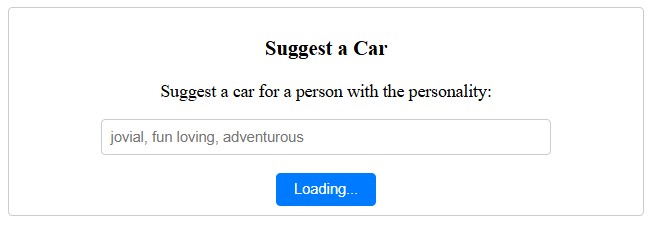
If you submit a prompt without an API key, you will get an error telling you to set GEMINI_API_KEY or GOOGLE_API_KEY.
Getting the API key
- Generate an API key for Gemini using Google AI Studio.
- Set the environment variable:
$env:GEMINI_API_KEY = "<your API key>"
export GEMINI_API_KEY=<your API key>
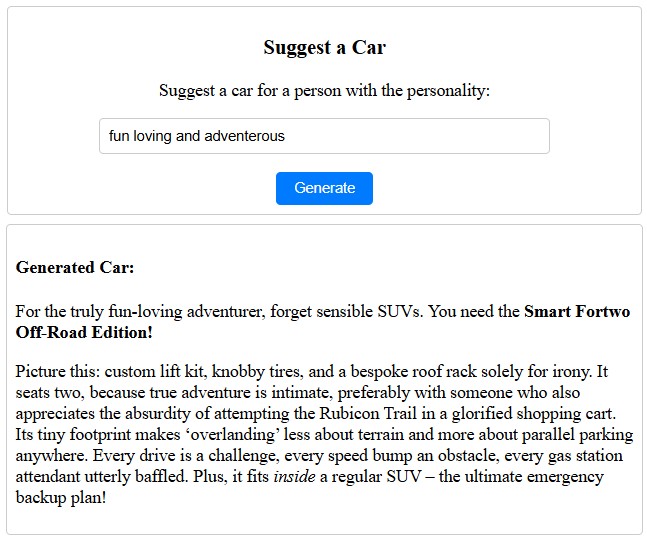
Once the key is set, the app should work:
Source code: ng-genkit-car-suggestor